The short answer
I built Rabbito, so yes, I'm biased. I've stuck to facts you can check. Rabbito is a free UPI expense tracker for Android that fills itself in: it reads your bank SMS and UPI payment alerts and logs every payment it recognises, right on your phone. No sign-up, no ads, and it has no internet access at all, so your data stays with you. And it's built with Google's Material 3 Expressive design, so it's actually nice to open every day.
The paid apps are great at other things. YNAB teaches you a budgeting method and Monarch tracks your whole net worth. The catch? None of the big paid apps says it works with Indian banks, so you may end up typing in every payment yourself. If you'd rather not, grab Rabbito free on Google Play.

A UPI expense tracker that fills itself in
Here's how I judge any expense app. You buy a chai at the stall and pay by UPI. How much work does it take before that payment shows up in your budget, in the right category?
With Rabbito, usually none. Your PhonePe alert or bank SMS comes in, and the app reads it right there on your phone and files it under food. With most budget apps, you open the app, type the amount, pick a category and tap save. Doing that once is fine. Doing it for every chai, auto ride and grocery run is where most of us give up on tracking. With Rabbito, you mostly don't have to do it at all.
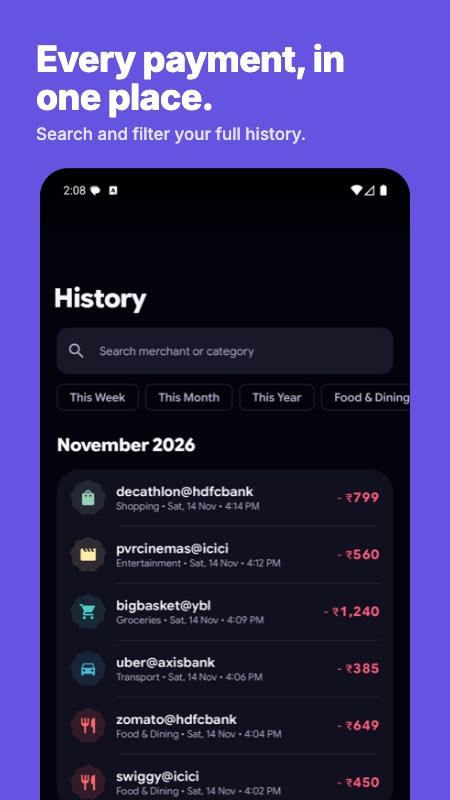
How Rabbito's SMS expense tracking works
Your bank already texts you about every debit. Rabbito simply reads those messages for you.
- Bank SMS and UPI alerts. It reads bank SMS plus payment notifications from GPay, PhonePe, Paytm and BHIM and from the SBI, HDFC, ICICI, Axis and Kotak apps. It recognises 54 banks and payment senders.
- Your history on day one. On first launch it can scan your past bank SMS, so your spending is already there when you open it.
- No duplicates. If an SMS and a notification describe the same payment, you get one entry, matched on the UPI reference.
- No noise. OTPs and failed payments are skipped.
- Nothing lost. A payment from a sender it doesn't recognise yet is still saved, marked "Unverified" so you can check it.
- It learns your categories. Move a merchant to a different category once, and future payments there go to that category too.
Try Rabbito free on Google Play →
A design you'll want to open every day
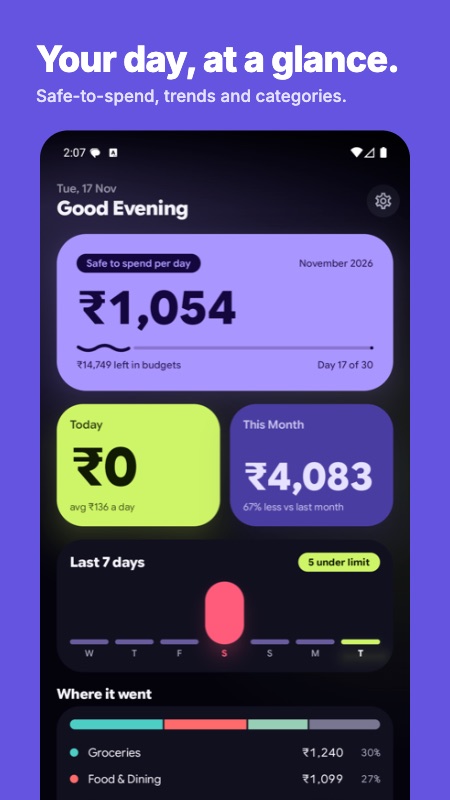
Money apps often feel like homework. I wanted Rabbito to feel like something you'd open just to check in, so it's built on Material 3 Expressive, Google's bolder, more playful style for Android apps.
- One number worth checking. The home screen leads with a big, bold figure: how much you can spend today and still stay within your budgets.
- Bold colour blocks. Deep violet with a single lime highlight for today, and solid tiles instead of busy gradients. A soft glow around the key blocks gives them depth.
- Round, friendly shapes. Big rounded cards, pill-shaped bars and buttons that change shape slightly when you press them.
- Motion that feels alive. Screens move with spring physics rather than fixed timers, and loading shows a morphing shape instead of a plain spinner.
- A floating navigation bar. Your main screens sit in one pill at the bottom, with the add button right beside it.
- Your colours, if you prefer. Turn on dynamic colour in Settings and the app takes its colours from your phone's wallpaper.
Your data never leaves your phone
An app that reads your SMS should earn your trust, so I built Rabbito with no way to upload anything.
- No internet permission. I removed Android's internet permission from the app completely. It can't upload your messages or your spending, even by accident.
- No account and no server. There's nothing to sign up for and nowhere for your data to go.
- No ads, no analytics. Nobody is watching how you use it.
- Encrypted and locked. Your data is encrypted on the phone, and the app opens with your fingerprint, face or PIN.
Budgets, charts and exports
Tracking is only half of it. Once your spending is in, Rabbito helps you do something with it.
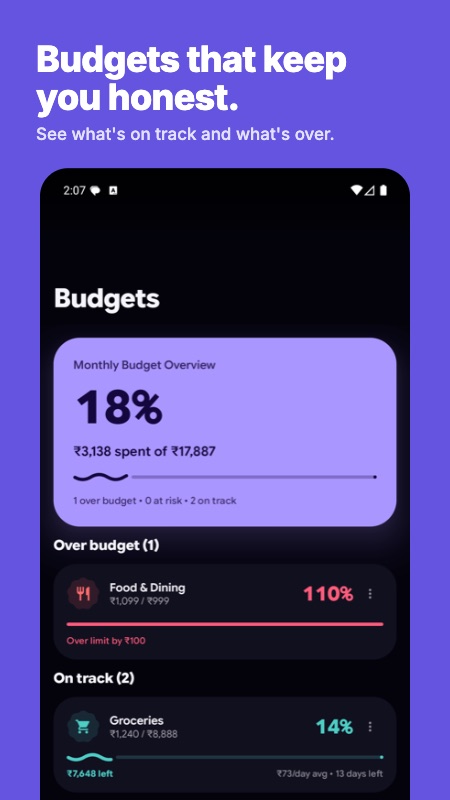
- Budgets that nudge you. Set a monthly limit for each category and you'll get an alert at 80% and again at 100%.
- Charts that answer "where did it go?" See your spending by day and by category, and how this month compares with last month.
- Recurring payments. Rabbito spots your monthly payments, like subscriptions and bills.
- Your data, your way. Export to CSV, Excel or PDF whenever you like.
Rabbito vs Axio: a Walnut alternative
Axio (you might know it as Walnut) is the app here most like Rabbito. It also reads your bank SMS to track spending and adds bill reminders and receipt photos. Its tracker is free too.
The difference is what else is in the app. Axio is also a lending and investment app, offering Pay Later, personal loans and fixed deposits. Rabbito sells nothing, lends nothing and can't reach the internet. Pick Axio if you'd like credit and investments in the same app as your tracker. Pick Rabbito if you just want a private tracker.
Rabbito vs Money Manager
Money Manager by Realbyte is made for people who like to stay in control, with double-entry bookkeeping and lots of accounts and cards. From what its listing shows, it's a manual tracker, so you enter each transaction yourself, and the free version shows ads. Pick Money Manager if you enjoy keeping a detailed ledger. Pick Rabbito if you'd rather the ledger kept itself.
A free YNAB and Monarch alternative for India
The big paid budget apps are polished, but they're built around linking your bank account, and none of their sites confirms that Indian banks can connect.
- YNAB teaches zero-based budgeting, giving every rupee a job before you spend it. Its direct bank import works with some US, Canadian, UK and EU banks; everywhere else, you import files or type.
- Monarch Money puts spending, net worth and investments in one dashboard. Its bank connections page doesn't say which countries are supported.
- Goodbudget gives a household shared envelopes, but its bank sync covers US banks only.
- Wallet by BudgetBakers says it connects to over 15,000 banks worldwide, but doesn't say whether any Indian banks are on that list.
If you want a budgeting method or net worth tracking and don't mind typing, they're worth a look. If you want your UPI spending tracked for you, for free, Rabbito is built for exactly that.
What they cost
These prices come from vendor pages and Play listings as of 20 November 2026, in US dollars. The Play Store in India may show rupee prices, so check before you pay.
- Rabbito: free. No ads, no in-app purchases, no subscription.
- Axio: the tracker is free; Axio also sells loans and fixed deposits.
- Money Manager: free with ads; a paid edition removes them.
- YNAB: $14.99 a month or $109 a year, with a 34-day free trial.
- Monarch: $14.99 a month or $99.99 a year for Core; Plus is $199.99 a year.
- Goodbudget: free tier; Premium is $10 a month or $80 a year.
- Wallet: free tier; Premium is priced inside the app.
The listed paid plans start at $80 a year, for apps that don't say they work with Indian banks. Rabbito costs nothing.
Get Rabbito free on Google Play →
What's coming next
Rabbito is young, and I'm working through a clear list.
- Smarter totals. Refunds will be netted against the original spend, and transfers between your own accounts will stop counting as spending. For now, you can fix those entries by hand.
- More banks recognised exactly. Today, nine of the 54 have exact message templates, and the plan is to cover the top 40 or so. The rest go through a general reader.
- "Missed a transaction?" A review screen for payments Rabbito isn't sure about.
- More recurring payments. Weekly and yearly ones, not just monthly.
- Hindi and Hinglish bank messages.
Good to know today: Rabbito is Android only, and your data lives on one phone, so export a backup now and then.
Which one should you download?
- You're on Android, pay by UPI and want tracking with almost no typing and no data leaving your phone: Rabbito.
- You want SMS tracking plus credit and fixed deposits in one app: Axio.
- You want a detailed manual ledger: Money Manager.
- You want a budgeting method that changes your habits: YNAB.
- You're on an iPhone, or your accounts are in the US, Canada, UK or EU: YNAB. Monarch too, if your bank shows up on its connections page.
Questions people ask about Rabbito
Is Rabbito really free?
Yes. There are no ads, no in-app purchases and no subscription.
Does Rabbito work without internet?
Yes. It doesn't need internet at all, and it can't use it: the app has no internet permission.
Is it safe to give Rabbito SMS access?
It's a fair question for any app that reads your messages. Rabbito reads them on your phone, skips OTPs and has no way to upload anything. Your data is encrypted and the app is locked with your fingerprint, face or PIN.
Which banks and UPI apps does it work with?
It reads bank SMS from HDFC, SBI, ICICI, Axis, Kotak, IDFC FIRST, Yes Bank and more, 54 banks and payment senders in all. It also reads payment alerts from GPay, PhonePe, Paytm and BHIM.
Is Rabbito a good Walnut alternative?
If you used Walnut for its SMS tracking, yes. Rabbito does the same SMS tracking job, works fully offline and doesn't sell loans.
Is there an iPhone version?
No. Rabbito is Android only, for Android 8.0 and later.
Can I export my data?
Yes, to CSV, Excel or PDF, and share the file however you like.
Get Rabbito
Rabbito is free on Google Play. Install it, allow SMS and notification access and let it scan your past messages. Most of your month will fill itself in.
If you're building a product for Indian users and wondering how much can run on the phone alone, my team at TriSquare is happy to talk it through. We also take on product builds like this for clients.
Google Play and the Google Play logo are trademarks of Google LLC.